<?xml version="1.0" encoding="UTF-8"?><rss version="2.0"
	xmlns:content="http://purl.org/rss/1.0/modules/content/"
	xmlns:dc="http://purl.org/dc/elements/1.1/"
	xmlns:atom="http://www.w3.org/2005/Atom"
	xmlns:sy="http://purl.org/rss/1.0/modules/syndication/"
		>
<channel>
	<title>Comments for Screwed by Design</title>
	<atom:link href="http://screwedbydesign.com/software/comments/feed" rel="self" type="application/rss+xml" />
	<link>http://screwedbydesign.com/software</link>
	<description>Just another WordPress weblog</description>
	<lastBuildDate>Tue, 11 Dec 2007 18:26:02 +0000</lastBuildDate>
	<generator>http://wordpress.org/?v=2.9.2</generator>
	<sy:updatePeriod>hourly</sy:updatePeriod>
	<sy:updateFrequency>1</sy:updateFrequency>
		<item>
		<title>Comment on SearchWords 0.3 by Brandon Oglesby</title>
		<link>http://screwedbydesign.com/software/2007/01/searchwords_03.html/comment-page-1#comment-19</link>
		<dc:creator>Brandon Oglesby</dc:creator>
		<pubDate>Tue, 11 Dec 2007 18:26:02 +0000</pubDate>
		<guid isPermaLink="false">http://www.screwedbydesign.com/software2/?p=6#comment-19</guid>
		<description>Nice work. It appears this has been included in FF3.  Great feature.</description>
		<content:encoded><![CDATA[<p>Nice work. It appears this has been included in FF3.  Great feature.</p>
]]></content:encoded>
	</item>
	<item>
		<title>Comment on SearchWords 0.3 by Metaphysician</title>
		<link>http://screwedbydesign.com/software/2007/01/searchwords_03.html/comment-page-1#comment-18</link>
		<dc:creator>Metaphysician</dc:creator>
		<pubDate>Sat, 10 Nov 2007 16:55:01 +0000</pubDate>
		<guid isPermaLink="false">http://www.screwedbydesign.com/software2/?p=6#comment-18</guid>
		<description>This is a great little extension for all us keyboard-before-mouse people. I noticed that Opera has similar functionality, and went looking for a Firefox extension -- voila!

Since people in these comments seem to be asking, you set the key words by  selecting the searchbar dropdown, and then &quot;manage search engines&quot; at the bottom.

Ryan -- nice work! Some small suggestions for future versions: when you open that search dropdown, it would be awesome to see the shortcuts next to the search engines there. Just in case you&#039;re forgetful and don&#039;t remember what the settings were :-) A fancier feature would be if you mouse over the regular URL entry spot (I seem to be terminologically challenged today), show current searchword shortcuts as mouseover text.</description>
		<content:encoded><![CDATA[<p>This is a great little extension for all us keyboard-before-mouse people. I noticed that Opera has similar functionality, and went looking for a Firefox extension &#8212; voila!</p>
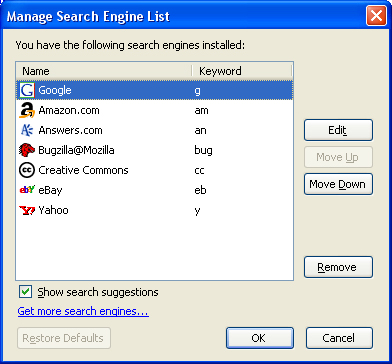
<p>Since people in these comments seem to be asking, you set the key words by  selecting the searchbar dropdown, and then &#8220;manage search engines&#8221; at the bottom.</p>
<p>Ryan &#8212; nice work! Some small suggestions for future versions: when you open that search dropdown, it would be awesome to see the shortcuts next to the search engines there. Just in case you&#8217;re forgetful and don&#8217;t remember what the settings were <img src='http://screwedbydesign.com/software/wp-includes/images/smilies/icon_smile.gif' alt=':-)' class='wp-smiley' />  A fancier feature would be if you mouse over the regular URL entry spot (I seem to be terminologically challenged today), show current searchword shortcuts as mouseover text.</p>
]]></content:encoded>
	</item>
	<item>
		<title>Comment on SearchWords 0.3 by Andros</title>
		<link>http://screwedbydesign.com/software/2007/01/searchwords_03.html/comment-page-1#comment-17</link>
		<dc:creator>Andros</dc:creator>
		<pubDate>Sun, 16 Sep 2007 15:55:43 +0000</pubDate>
		<guid isPermaLink="false">http://www.screwedbydesign.com/software2/?p=6#comment-17</guid>
		<description>Hi, Really Great work!
I just love it... like Opera..
I hope you can improve this extension capabilitie, so we can see Search term suggestions well we type it in the URL bar... Just like search box... i hope you can do that?
Thanks Again</description>
		<content:encoded><![CDATA[<p>Hi, Really Great work!<br />
I just love it&#8230; like Opera..<br />
I hope you can improve this extension capabilitie, so we can see Search term suggestions well we type it in the URL bar&#8230; Just like search box&#8230; i hope you can do that?<br />
Thanks Again</p>
]]></content:encoded>
	</item>
	<item>
		<title>Comment on SearchWords 0.3 by Jeremy</title>
		<link>http://screwedbydesign.com/software/2007/01/searchwords_03.html/comment-page-1#comment-16</link>
		<dc:creator>Jeremy</dc:creator>
		<pubDate>Sun, 02 Sep 2007 12:50:51 +0000</pubDate>
		<guid isPermaLink="false">http://www.screwedbydesign.com/software2/?p=6#comment-16</guid>
		<description>Hey, I&#039;ve installed SearchWords, but I was wondering how to configure the options (like in https://addons.mozilla.org/en-US/firefox/addons/previews/4328)

Please tell me how to get to the configuration. Btw, I&#039;m using FF 2.0.0.6</description>
		<content:encoded><![CDATA[<p>Hey, I&#8217;ve installed SearchWords, but I was wondering how to configure the options (like in <a href="https://addons.mozilla.org/en-US/firefox/addons/previews/4328)" rel="nofollow">https://addons.mozilla.org/en-US/firefox/addons/previews/4328)</a></p>
<p>Please tell me how to get to the configuration. Btw, I&#8217;m using FF 2.0.0.6</p>
]]></content:encoded>
	</item>
	<item>
		<title>Comment on Microsummary Manager 0.5 Alpha by Ryan</title>
		<link>http://screwedbydesign.com/software/2007/02/microsummary_manager_05_alpha.html/comment-page-1#comment-23</link>
		<dc:creator>Ryan</dc:creator>
		<pubDate>Fri, 31 Aug 2007 06:24:57 +0000</pubDate>
		<guid isPermaLink="false">http://www.screwedbydesign.com/software2/?p=7#comment-23</guid>
		<description>Hi JW, sorry about the extreme delay in moderating/responding to your comment - I was off on vacation.

In Firefox there are generally two unique (but sort of related) things lumped under the microsummary name: Live titles (which are regular bookmarks with titles that are updated via microsummaries) and microsummary generators (which allow site authors and anyone willing to construct a generator to extract text from any page via XSLT to be displayed as a live title).

This extension mainly provides an interface for deleting microsummary generators (Firefox provides limited UI for installation, but none for uninstalling) and not much more at this point - though I hope to change that once I&#039;ve got some free time! ;)

As a user, microsummaries are exposed when you&#039;re bookmarking a page. If a site offers microsummaries, you&#039;ll see the name field turn into a drop down menu where can choose to use the site&#039;s provided microsummary. If the site does not offer a microsummary, this is where the generators come in. http://userstyles.org/livetitle for example offers generators for sites which don&#039;t provide microsummaries. If you were to install one of those and then bookmark a site which it operates on, you would see the same drop down menu and the new generated title offered.

It&#039;s a bit late so above probably isn&#039;t as clear as it could be, but in short: microsummaries are pieces of web pages extracted at a regular interval (usually 30min) and displayed in the place of a regular bookmark&#039;s title.

http://wiki.mozilla.org/Microsummaries has a pretty good explanation as well.

- Ryan</description>
		<content:encoded><![CDATA[<p>Hi JW, sorry about the extreme delay in moderating/responding to your comment &#8211; I was off on vacation.</p>
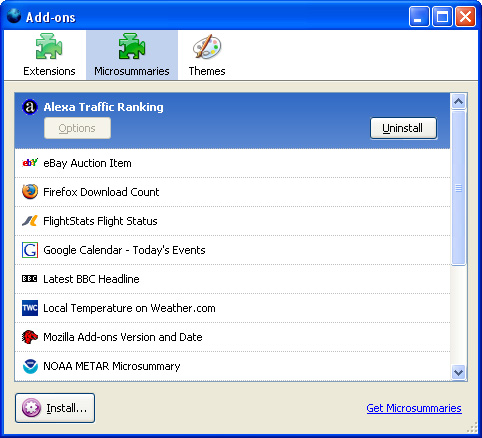
<p>In Firefox there are generally two unique (but sort of related) things lumped under the microsummary name: Live titles (which are regular bookmarks with titles that are updated via microsummaries) and microsummary generators (which allow site authors and anyone willing to construct a generator to extract text from any page via XSLT to be displayed as a live title).</p>
<p>This extension mainly provides an interface for deleting microsummary generators (Firefox provides limited UI for installation, but none for uninstalling) and not much more at this point &#8211; though I hope to change that once I&#8217;ve got some free time! <img src='http://screwedbydesign.com/software/wp-includes/images/smilies/icon_wink.gif' alt=';)' class='wp-smiley' /> </p>
<p>As a user, microsummaries are exposed when you&#8217;re bookmarking a page. If a site offers microsummaries, you&#8217;ll see the name field turn into a drop down menu where can choose to use the site&#8217;s provided microsummary. If the site does not offer a microsummary, this is where the generators come in. <a href="http://userstyles.org/livetitle" rel="nofollow">http://userstyles.org/livetitle</a> for example offers generators for sites which don&#8217;t provide microsummaries. If you were to install one of those and then bookmark a site which it operates on, you would see the same drop down menu and the new generated title offered.</p>
<p>It&#8217;s a bit late so above probably isn&#8217;t as clear as it could be, but in short: microsummaries are pieces of web pages extracted at a regular interval (usually 30min) and displayed in the place of a regular bookmark&#8217;s title.</p>
<p><a href="http://wiki.mozilla.org/Microsummaries" rel="nofollow">http://wiki.mozilla.org/Microsummaries</a> has a pretty good explanation as well.</p>
<p>- Ryan</p>
]]></content:encoded>
	</item>
	<item>
		<title>Comment on Microsummary Manager 0.5 Alpha by JW</title>
		<link>http://screwedbydesign.com/software/2007/02/microsummary_manager_05_alpha.html/comment-page-1#comment-22</link>
		<dc:creator>JW</dc:creator>
		<pubDate>Fri, 17 Aug 2007 18:01:38 +0000</pubDate>
		<guid isPermaLink="false">http://www.screwedbydesign.com/software2/?p=7#comment-22</guid>
		<description>Ryan,
  I guess I don&#039;t know what your Microsummary Manager really does or how to make proper use of it.

  I don&#039;t know how to really use a Microsummary or what it does for me.  I know, you&#039;re probably thinking that&#039;s pretty lame, but I&#039;ve never used one or if I did I didn&#039;t know I was using one.  Please enlighten me.  I checked out the following page, but still feel pretty stupid about it:
http://developer.mozilla.org/en/docs/Creating_a_Microsummary

  I was a programmer while in undergrad (now work in network security and am mainly a manager using my MBA more than my BS), so no need to dumb it down too much, but when I ran across your add-on I found myself wondering, &quot;WTF?&quot;

Thanks,
JW</description>
		<content:encoded><![CDATA[<p>Ryan,<br />
  I guess I don&#8217;t know what your Microsummary Manager really does or how to make proper use of it.</p>
<p>  I don&#8217;t know how to really use a Microsummary or what it does for me.  I know, you&#8217;re probably thinking that&#8217;s pretty lame, but I&#8217;ve never used one or if I did I didn&#8217;t know I was using one.  Please enlighten me.  I checked out the following page, but still feel pretty stupid about it:<br />
<a href="http://developer.mozilla.org/en/docs/Creating_a_Microsummary" rel="nofollow">http://developer.mozilla.org/en/docs/Creating_a_Microsummary</a></p>
<p>  I was a programmer while in undergrad (now work in network security and am mainly a manager using my MBA more than my BS), so no need to dumb it down too much, but when I ran across your add-on I found myself wondering, &#8220;WTF?&#8221;</p>
<p>Thanks,<br />
JW</p>
]]></content:encoded>
	</item>
	<item>
		<title>Comment on SearchWords 0.3 by Asaf</title>
		<link>http://screwedbydesign.com/software/2007/01/searchwords_03.html/comment-page-1#comment-15</link>
		<dc:creator>Asaf</dc:creator>
		<pubDate>Mon, 06 Aug 2007 06:39:53 +0000</pubDate>
		<guid isPermaLink="false">http://www.screwedbydesign.com/software2/?p=6#comment-15</guid>
		<description>Hi, Great work!
Wanted to know if you are thinking of adding the option to do the same in the search bar and not in the address bar?

Thanks again,
Asaf.</description>
		<content:encoded><![CDATA[<p>Hi, Great work!<br />
Wanted to know if you are thinking of adding the option to do the same in the search bar and not in the address bar?</p>
<p>Thanks again,<br />
Asaf.</p>
]]></content:encoded>
	</item>
	<item>
		<title>Comment on SearchWords 0.3 by Ydef</title>
		<link>http://screwedbydesign.com/software/2007/01/searchwords_03.html/comment-page-1#comment-14</link>
		<dc:creator>Ydef</dc:creator>
		<pubDate>Thu, 26 Jul 2007 04:29:11 +0000</pubDate>
		<guid isPermaLink="false">http://www.screwedbydesign.com/software2/?p=6#comment-14</guid>
		<description>Does this plugin work at all for seamonkey?  I saw it under the seamonkey extensions section but when I attmpted to install it it said no script found.</description>
		<content:encoded><![CDATA[<p>Does this plugin work at all for seamonkey?  I saw it under the seamonkey extensions section but when I attmpted to install it it said no script found.</p>
]]></content:encoded>
	</item>
	<item>
		<title>Comment on Microsummary Manager 0.5 Alpha by Jason</title>
		<link>http://screwedbydesign.com/software/2007/02/microsummary_manager_05_alpha.html/comment-page-1#comment-21</link>
		<dc:creator>Jason</dc:creator>
		<pubDate>Sun, 01 Jul 2007 21:54:02 +0000</pubDate>
		<guid isPermaLink="false">http://www.screwedbydesign.com/software2/?p=7#comment-21</guid>
		<description>MM0.5alpha doesn&#039;t work with &quot;MR Tech Local Install&quot; and/or &quot;All in one Sidebar&quot; installed.</description>
		<content:encoded><![CDATA[<p>MM0.5alpha doesn&#8217;t work with &#8220;MR Tech Local Install&#8221; and/or &#8220;All in one Sidebar&#8221; installed.</p>
]]></content:encoded>
	</item>
	<item>
		<title>Comment on SearchWords 0.3 by Wojtek</title>
		<link>http://screwedbydesign.com/software/2007/01/searchwords_03.html/comment-page-1#comment-13</link>
		<dc:creator>Wojtek</dc:creator>
		<pubDate>Wed, 27 Jun 2007 11:47:38 +0000</pubDate>
		<guid isPermaLink="false">http://www.screwedbydesign.com/software2/?p=6#comment-13</guid>
		<description>Sorry I mean function not future :)</description>
		<content:encoded><![CDATA[<p>Sorry I mean function not future <img src='http://screwedbydesign.com/software/wp-includes/images/smilies/icon_smile.gif' alt=':)' class='wp-smiley' /> </p>
]]></content:encoded>
	</item>
</channel>
</rss>